Showing posts with label applications. Show all posts

2012-01-21

TotalFinder brings tabs to you Mac finder

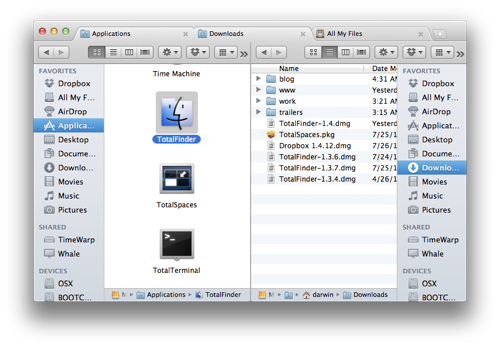
If you have fallen in love with tabbed web browsers, you may have wondered why the people at Apple  haven't adopted this for their technology and workflow as core to their OS.  The good news however, is that one solo guy (Antonin) who operates as BinaryAge has seen this as a fundamental feature for any finder workflow. Antonin as a result has created TotalFinder. TotalFinder runs as a Finder plugin and enables the tabbed browsing of your finder windows. As a workflow solution, this is amazing as it allows the user to have multiple finder windows open - perfect for auditioning sounds, copying files and general house keeping. You can also run in 'Dual Mode' which allows you to run not 1, but 2 x tabbed window sets side by side! And if you use Lion and don't like Terminal, it allows you to view ALL system files (in Lion these are now hidden by default).

Some of the key features include:

·      Tabbed Browsing

o   Add tabs on top of Finder. The same tabs as seen in Google Chrome.

·      Dual Mode

o   Display two Finder windows side-by-side in dual mode.

·      Folders on Top

o   Don't make me think. Folders should always go first in list view.

·      Show System Files

o   Show me all files on the disk. I'm not afraid to see the cruft.

·      Visor

o   Convenient system-wide Finder always one key-press away.

·      Cut & Paste

o   Use keyboard shortcuts to move files around. Faster than drag & drop. 

TotalFinder is compatible with both Snow Leopard and Lion and is available as a 14 day trial and is priced at only $18US. Well worth it!  And if you have 2 other friends who would like this, you can get 3 licenses for only $36. Maybe a great birthday gift for someone??? I have been using TotalFinder for a few weeks now and there is no way I will be going without it again.
2011-04-19

Do you run 2 monitors on your mac?

If you run 2 monitors on your Mac and are sick of always having to go to only one monitor to get to your menus then there is a solution! Andreas Hegenberg has created a nifty little app called Secondbar.

2011-02-15

AudioFinder as a Plugin Manager

Although AudioFinder was reviewed in my previous post as being a great sound library database tool, I wanted to touch on another features of the software.

Firstly, AudioFinder can be used as a plugin manager. What does this mean? Well quite simply you can create sets of your plugins and have AudioFinder activate and deactivate your plug in sets. Why is this handy? Well if you are running a swap of plugins and you don't happen to want say your "Waves" plugins loaded as your dongle is on another machine, you can simply omit these from one of your sets. You may also have sets set up for particular tasks you are doing. ie - editing or mixing. Another great aspect of the AudioFinder Plugin manager is that each plugin is listed with tits release version, making this easy to check for any updates/ clashes etc.

2009-09-08

Keep your Apple 3rd Party Apps up to date


Here is a Mac widget which will allow you to keep your 3rd party apps up to date. It supports Apple’s software directory, MacUpdate and Version Tracker. It will present you with a tidy link list of all the updates found, enabling you to read release-notes and download the the updates quickly and painlessly.

Amongst the key features are automatic update checks once per day or week, Growl notifications, powerful configuration possibilities, support for Apple’s download pages, MacUpdate and VersionTracker and an extensive documentation built right into the widget (but you can also read the documentation in your browser).

2009-07-24

A few FREE Mac Apps worth mentioning

It has been quite a while since my last post. What I wanted to share today are a couple more small applications which have made my workflow much easier- especially in regards to online collaborations.

Firstly I wanted to mention a Mozilla Firefox extension called Zotero. Zotero is a web based research tool which allows you to manage, collect and cite research sources. Although this is not necessary for the average sound professional, what makes this fantastic is the ability to sync web sources. This is is extremely useful for users with multiple computers, or for workplaces who want to share "common sites". I have used del.icio.us for this same purpose before, however Zotero is far quicker, due to links living locally after sync.

DropBox is another app which I am tending to use more and more. DropBox is a cross platform + web based file sharing system. For free you are granted 2Gb of fully sync-able data! I have a folder set up on all of my computers and any documents or files which I always need access to are only a click away. DropBox also keeps a backup of your data on the web incase of any accidental deleting. This works just like any other folder in your finder.... except it can be shared and synced to anyone you wish - or kept private. Some uses I have had are: contact lists, app udates, picture updates, or just sending audio! This is truly one cool app!

Remote Pad an app for the iPhone and a computer which allows you to use your iPhone/ iPod touch as a remote touch mouse over a wifi network. Great for presentations!

What is great about the mentioned applications is the fact that they are all free!