With a clean install of Lion on your new Mac it is now almost impossible to use your original install disks to do a clean install of Logic 9 and FCP7. Below I have some of the work arounds that will allow you to overcome this very frustrating process. Although not being a complete install of every disk, at least you can get the applications working.
For Apple FCP7 and DVD Studio use the following terminal commands:
FCP7
sudo installer -package /Volumes/Final\ Cut\ Studio\ Install/Installer/FinalCutStudio.mpkg -target /
DVD studio Pro/ Compressor etc
sudo installer -package /Volumes/DVD\ Studio\ Pro\ Content/Installer/DVDStudioProContent.mpkg -target /
For Logic 9, download the update from:
http://support.apple.com/kb/DL1014
This will install the Logic Application. You do not need a previous version of the software as it installs a fresh new one.
With all of the application you will then enter your details and serial numbers on the first launch of the applications. I hope I have saved you some time! The downside of these methods is that I could not get the media disks to install properly. I tried disc images and hard drive installs but with no luck. You may be best to get the content from a friends hard drive and just re-target it after copying.
Showing posts with label Apple. Show all posts
Showing posts with label Apple. Show all posts


2012-03-16
Motion JPEG removed from OS X Lion
As many people in audio post have worked with the Motion JPEG A compression format for images, please beware that this codec is no longer part of Quicktime in OS X Lion. The codec works up until OS X 10.6.x only
Motion JPEG A was a great codec as it allowed for low picture sizes with relatively good image quality and almost zero system lag when working with ProTools.
MPEG Streamlip will still play the Motion JPEG files however these will need ot be converted to be compatible with Quicktime and for use in ProTools
Motion JPEG A was a great codec as it allowed for low picture sizes with relatively good image quality and almost zero system lag when working with ProTools.
MPEG Streamlip will still play the Motion JPEG files however these will need ot be converted to be compatible with Quicktime and for use in ProTools
2012-01-21
TotalFinder brings tabs to you Mac finder
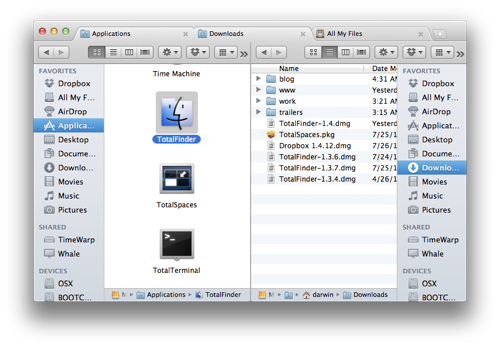
Some of the key features include:
· Tabbed Browsing
o Add tabs on top of Finder. The same tabs as seen in Google Chrome.
· Dual Mode
o Display two Finder windows side-by-side in dual mode.
· Folders on Top
o Don't make me think. Folders should always go first in list view.
· Show System Files
o Show me all files on the disk. I'm not afraid to see the cruft.
· Visor
o Convenient system-wide Finder always one key-press away.
· Cut & Paste
o Use keyboard shortcuts to move files around. Faster than drag & drop.
2011-07-21
OSX 10.7 Lion and some new Mac models out now
Well the release of Lion and two new Mac models have been highly anticipated and today they have been officially released. If you are running Pro Tools do not rush to install Lion as it is not yet qualified! Lion doesn't bring many more features to the table, however it does offer quite a few refinements, including re-sizable windows from any corner. You can read more here.
Appart from Lion, Apple today also released a new range of MacBook Airs and Mac Minis. The Airs now come with Core i5 and i7 processors claiming speeds up to 2.5 times as fast as the previous model.
What I was interested in was the new Mac Minis. These too have had the i5 and i7 upgrade and now appear to be a desktop version of the MacBook Airs. This includes the redesign of the housing to EXCLUDE the internal DVD drive. I was completely optimistic in hoping that this model may of included Blu-Ray as many people are using Mac Minis for home theater use. Apple have been having licensing issues with the inclusion of Blu-Ray drives, however I had hoped that this may have been resolved. Now if you want a Mac Mini you need to purchase an external SuperDrive separately. Something that MacBook Air owners have already been doing. I feel that Apple will lose sales on the Mac Mini on this detail alone... unless they release an external Blu-Ray drive in the near future. If you are wanting the mini for a HTPC you may be better off buying the recently outdated generation... it will be cheaper and includes an internal DVD drive!
2011-07-14
iTunes Australia just got 20% cheaper

2011-06-03
Neyrinck V-Control Pro for iPad

My initial impression was that V-Control was a gimick, a toy, and something used just to show your friends as I was quite dubious about not having "actual" faders to push and pull. However this is not the case. This is actually a very serious piece of software and the response of the touch faders is excellent. Panning using the virtual pan pots takes some getting used to, however the new surround panners compensate for this. It also supports flip mode, sends, a scrub and shuffle, group suspend and many more features...
At US$49.99 or AUD$59.99 V-Control on the iPad is now a far cheaper option than any other control surface.... plus you can check your email, read the paper and play games in your downtime! even factoring an iPad, the price and flexibility of this configuration is amazing!
2011-04-06
Apple Magic Trackpad and Pro Tools

After hypothesising about the new Apple Magic Trackpad in July last year, I have now had a chance to have a proper play with it in conjunction with my Pro Tools setup.
I have been using a Kensington Trackball ever since I started my working career, so jumping across to the Magic Trackpad was rather peculiar to start with. I have a MacBook so using it's inbuilt Trackpad always seems so limited when working within Pro Tools. In many cases I would just connect my trackball to keep my work flow efficient. The Magic Trackpad is quite different however. Although seeming to be a bigger version of the laptop trackpad, the Magic Trackpad is so much more.
After setting up the Magic trackpad via bluetooth the system preferences allow some customisation of the gestures which now allow you to control and customise your magic Trackpad. I did find these very limited, and the settings are all global controls meaning that you cannot have specific gestures for specific programs- something that Kensington allow for with its Trackballs. The program BetterTouchTool, a freeware application opens up these gestures by having this program sit on top of the Apple System Prefs. This allows for specific gestures for specific applications. Once BTT is running, the Apple Magic Trackpad comes into it's own. This makes the Magic Trackpad ideal as an editing and mixing peripheral, as you can fade, pan in surround and edit far quicker than using a conventional mouse. I also have BTT setup to switch between Pro Tools and AudioFinder, with a gesture (single click in middle at top) setup to export my AudioFinder sounds straight into my Pro Tools timeline! Very Cool indeed!!!
After taking a couple of days of getting use to and setting up gestures, the Magic Trackpad has now become my new "must have" editing and mixing tool. Because you can also import and export gestures from BTT, I can now easily use the Magic Trackpad with my laptop with no differences in my workflow.
2011-02-15
AudioFinder as a Plugin Manager
Although AudioFinder was reviewed in my previous post as being a great sound library database tool, I wanted to touch on another features of the software.
Firstly, AudioFinder can be used as a plugin manager. What does this mean? Well quite simply you can create sets of your plugins and have AudioFinder activate and deactivate your plug in sets. Why is this handy? Well if you are running a swap of plugins and you don't happen to want say your "Waves" plugins loaded as your dongle is on another machine, you can simply omit these from one of your sets. You may also have sets set up for particular tasks you are doing. ie - editing or mixing. Another great aspect of the AudioFinder Plugin manager is that each plugin is listed with tits release version, making this easy to check for any updates/ clashes etc.
Firstly, AudioFinder can be used as a plugin manager. What does this mean? Well quite simply you can create sets of your plugins and have AudioFinder activate and deactivate your plug in sets. Why is this handy? Well if you are running a swap of plugins and you don't happen to want say your "Waves" plugins loaded as your dongle is on another machine, you can simply omit these from one of your sets. You may also have sets set up for particular tasks you are doing. ie - editing or mixing. Another great aspect of the AudioFinder Plugin manager is that each plugin is listed with tits release version, making this easy to check for any updates/ clashes etc.
2010-08-05
iTunes- Easiest way to get album art
Over the years I have been using various methods to acquire the album art for songs in my itunes collection. Now that I have permanent wifi access, getting album art for current CDs is not a problem, however I have copied many of my CDs to iTunes long before I had a permanent broadband connection. In getting album art for retrospective CD transfers I have tried various widgets and scripts. Most of which work, however most take quite some time to use as you can only go album by album through your collection. Well, here is a FAST method.
Firstly you will need to run an iTunes applescript called "tracks without artwork to playlist". This does as the name says, and creates a playlist based on tracks without artwork. Next you will need the iTunes applescript/application "Fetch Art". This allows the user to find and download the artwork to any selected tracks- despite the songs coming from one album or even various albums! This means that you can select all tracks in th e"non artwork" playlist and download their artwork in a matter of seconds.... much quicker than alternative methods. It is important to also note that all of this is free!
Firstly you will need to run an iTunes applescript called "tracks without artwork to playlist". This does as the name says, and creates a playlist based on tracks without artwork. Next you will need the iTunes applescript/application "Fetch Art". This allows the user to find and download the artwork to any selected tracks- despite the songs coming from one album or even various albums! This means that you can select all tracks in th e"non artwork" playlist and download their artwork in a matter of seconds.... much quicker than alternative methods. It is important to also note that all of this is free!
2010-07-28
Could this better sound editing?
How many of us are always trying to find the perfect way to work? When editing sound, the traditional mouse is the first peripheral to go due to bad ergonomics. Most editors work with trackballs, however even this tends to have slight problems depending on your desk/ chair height combination. Apple today released the Magic Trackpad. Could this be our next favorite editing tool? With only a quick look at it and no actual physical testing, I am unsure of how accurate cursor movements will be. If they are acurate, than this may be a handy device to have.


2010-01-28
The iPad has landed...

Finally after much speculation Apple has released it's much anticipated tablet- the iPad.
Apart from looking like a giant iPod Touch/ iPhone - already I can see where this device will find it's market. To be honest, I was dubious at first about the similarities to the iPod touch, however after some more thinking I can see where this device will be an awesome addition to a musicians arsenal.
Apart from being able to what you would expect: email, web, itunes, iphoto etc.... I think the iPad will be able to be unleashed as a multi faceted virtual instrument/ interface. Depending on what apps are created, I predict that the iPad will be able to be used for virtual keyboards/ synths, virtual drum kits, virtual tactile response interface and even a virtual mixer (maybe in conjunction with being connected to a PowerMac/ Macbook etc)... it will also be intersting to see if some of the big music software companies embrace this product as a control surface for their proprietry software.
2009-10-27
Apple Magic Mouse - Good for sound editors
Apple have recently updated some of their products including a new iMac, MacBook and a new mouse - the Magic Mouse. With the new iMac sporting cheaper pricing than their predecessors, what grabbed my interested was in fact the new mouse. At first I thought it just to be a new gimmick, however after viewing the Apple video demonstration, I soon saw a potential use for sound editors.
As a sound editor myself, I loath using the conventional computer mouse and as a result use a Kensington trackball. My problem with the mouse is that continually scrolling across a desk all day long brings on shoulder and back pain. Using the trackball eliminates this problem with an added bonus of giving me specific function buttons which I can set up shortcuts on.
The Magic Mouse seems (from the video) to allow the user to scroll both horizontally and vertically without having to physically scroll the mouse itself across your desk. The top shell of the mouse is an entire multi touch sensor. Thus working similar to an iphone/ipod touch touch screen. This will allow the user in ProTools (or any app for that matter) to easily screen scroll.
As a sound editor myself, I loath using the conventional computer mouse and as a result use a Kensington trackball. My problem with the mouse is that continually scrolling across a desk all day long brings on shoulder and back pain. Using the trackball eliminates this problem with an added bonus of giving me specific function buttons which I can set up shortcuts on.
The Magic Mouse seems (from the video) to allow the user to scroll both horizontally and vertically without having to physically scroll the mouse itself across your desk. The top shell of the mouse is an entire multi touch sensor. Thus working similar to an iphone/ipod touch touch screen. This will allow the user in ProTools (or any app for that matter) to easily screen scroll.
2009-07-24
A few FREE Mac Apps worth mentioning
It has been quite a while since my last post. What I wanted to share today are a couple more small applications which have made my workflow much easier- especially in regards to online collaborations.
Firstly I wanted to mention a Mozilla Firefox extension called Zotero. Zotero is a web based research tool which allows you to manage, collect and cite research sources. Although this is not necessary for the average sound professional, what makes this fantastic is the ability to sync web sources. This is is extremely useful for users with multiple computers, or for workplaces who want to share "common sites". I have used del.icio.us for this same purpose before, however Zotero is far quicker, due to links living locally after sync.
DropBox is another app which I am tending to use more and more. DropBox is a cross platform + web based file sharing system. For free you are granted 2Gb of fully sync-able data! I have a folder set up on all of my computers and any documents or files which I always need access to are only a click away. DropBox also keeps a backup of your data on the web incase of any accidental deleting. This works just like any other folder in your finder.... except it can be shared and synced to anyone you wish - or kept private. Some uses I have had are: contact lists, app udates, picture updates, or just sending audio! This is truly one cool app!
Remote Pad an app for the iPhone and a computer which allows you to use your iPhone/ iPod touch as a remote touch mouse over a wifi network. Great for presentations!
What is great about the mentioned applications is the fact that they are all free!
2009-04-17
Some of my thoughts on the new MacBook

After having acquired a new Aluminium 2.4GHz MacBook I thought that I would write about some of it's features and flaws as they relate to a sound person.
Firstly as noted in may of the forums, there are no longer any firewire ports (unless you opt for the cheaper "white model"). This limits the user to only 2 x USB ports. Normally this would be OK, as after all this is a laptop. However my problem with this is that that the USB ports are too close together! So if you want to plug 2 peripherals in ie. an interface and a hard drive, than you may come across the problem of only being able to plug one in at a time. Sure you can fix this with a hub, but then you need to carry a hub with you at all times... Having no Firewire opens up quite a few problems for many as many people I know own firewire drives. Another obvious problem is that if you have a Firewire interface... An advantage of most of the firewire drives was that you could daisy chain several together, the problem with USB drives (well all the ones that I own - or have seen advertised) is that they only have 1 x USB port. ie You can't daisy chain them.
On to a positive note about the new MacBooks... One cool feature which is now standard is the illuminated keyboard. This makes working in the studio very easy now as all of the keys are backlit. Another cool feature is the new designed trackpad. This is not only larger, but it supports multi touch gestures. this includes scrolling, rotating and best of all zooming!!! The zooming is great especially when reading text in Word or on the web.
Overall I am happy with this laptop as the performance for the cost is quite amazing. Luckily I do have several ProTools interfaces and many hard drive configurations so the USB issue isn't too much of a deal... well at least not now that I have shuffled my files around accordingly.
2009-03-04
New Macs released

Apple has just announced new release versions of the Mac Mini, iMac and Mac Pro.
The Mac Mini claims to be the most green desktop computer with speeds of 2.0GHz or 2.26GHz Intel Core 2 Duo processors. Further details can be found here.
The iMac is now NVIDIA based and is capable of up to 8Gb of Ram. Processor speeds are 2.66GHz, 2.93GHz, or 3.06GHz Intel Core 2 Duo processor.
The Mac Pro is now based on Intel's Nehalem architecture. This new architecture apparently will not suffer from the current memory bottlenecks. Processor Speeds are as follows:
8-core: Two 2.26GHz, 2.66GHz, or 2.93GHz Quad-Core Intel Xeon 5500 series processors
Quad-core: One 2.66GHz or 2.93GHz Quad-Core Intel Xeon 3500 series processor
Ram is up to 32Gb.
8-core: Eight memory slots (four per processor) supporting up to 32GB of main memory using 1GB, 2GB, or 4GB DIMMs
Quad-core: Four memory slots supporting up to 8GB of main memory using 1GB or 2GB DIMMs
2009-03-02
Safari 4 (public beta)

Apple has released the Safari Version 4 in public beta form. This is a public beta, which allows anybody to download and test the software ahead of an official release.
Some of the new features include:
Cover Flow - Cover Flow presents full-page previews of sites in your site history and bookmarks. Flip through them as you do albums in iTunes to find the site you’re looking for.
Top Sites - Top Sites lets you see all your favorite websites at a glance. One click opens a favorite site. And you can drag site thumbnails to customize your Top Sites page.
History View - Take a closer look at your browsing history in the History view. Search for previously visited sites, drag web pages to your bookmarks, and clear individual items. Safari displays your history using Cover Flow, so you can flip through your search results as easily as you flip through iTunes album art.
With over 150 new features, the list is far too extensive to list here. Click here to visit the official Safari features web page.
2008-10-15
New Mac Books

After much speculation and anticipation, Apple has finally released it's newest range of Mac Books. As a sound editor, one limitation on the new Mac Book models is the lack of a firewire port. This makes using additional interfaces and drives, USB dependent. The Mac Book Pro on the other hand, does have one Firewire 800 port.
For further information, visit the Apple website.
2008-09-10
iTunes 8 Big Brother "Genius" -
Today saw the release of some new music related products from Apple. These releases include new revised iPods as well as the release of iTunes 8. iTunes 8 introduces a new feature named "Genius", which can analyze your music playlists and give you recommendations for other music which may compliment your musical tastes. For this to work though, you need to agree that "Genius" will be sending your iTunes information to Apple, and the Apple Store in turn will send you new music recommendations. Unfortunately this "Genius" feature does not work as a stand alone feature on a host computer using your own music library as a resource pool. I for one am not a fan of Apple knowing my musical tastes and having them make music recommendations for me in the hope that I will purchase music from their iTunes Store. As a result I will be using my iTunes with "Genius" disabled.
2008-08-21
Free Folder Sync Application
Do you backup from one folder to another?
Do you need to clone folders?
Do you not use Automator for folder synchronization?
If you answer yes to these, then check out this free folder sync application!
About halfway down the page is an application created by Thomas Robisson and Philippe Galmel, named "SyncTwoFolders".
Alternatively, this is the link to the Intel Version.
Do you need to clone folders?
Do you not use Automator for folder synchronization?
If you answer yes to these, then check out this free folder sync application!
About halfway down the page is an application created by Thomas Robisson and Philippe Galmel, named "SyncTwoFolders".
Alternatively, this is the link to the Intel Version.
2008-08-14
Free file re-namer
I have been using a freeware (Donation to Unicef if you wish) file re-naming application since moving to OS X. R-Name is a very powerful utility which is very easy to use and saves you having to write an Automator script to do simple file/ folder renaming. This is invaluable for me as I do a lot of field recordings and sound effects creating which I need to keep very ordered. Where I use this the most, is adding "key" words to my file names as I use the ProTools digibase for most of my SFX searching. I can also rename an entire folder with an abbreviation of the job title and any other relevant information. You can also preview your name changes before committing to the renamed file - which is very handy!!!
Some features include:
- adding characters to the start or end of a file name
- sequential file naming
- find and replace
- removing characters from the start or end
- changing extensions
- changing the case of the letters
and my favorite...
- append names pre and post extension
Click to download
Some features include:
- adding characters to the start or end of a file name
- sequential file naming
- find and replace
- removing characters from the start or end
- changing extensions
- changing the case of the letters
and my favorite...
- append names pre and post extension
Click to download
Subscribe to:
Posts (Atom)